
Text to Speech Reader'ı İndir – AI Ses, PDF ve Word Dönüştürme ile Verimliliği Artırın
Genel Bakış
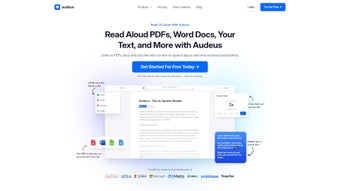
Audeus Text to Speech Reader, herhangi bir yazılı içeriği—PDF, Microsoft Word belgeleri, web sayfaları veya düz metin—doğal sesli bir ses dosyasına dönüştüren son teknoloji web‑tabanlı bir uygulamadır. Öğrenciler, araştırmacılar, profesyoneller ve büyük miktarda bilgi tüketen herkes için tasarlanan bu araç, kullanıcıların metni dinlerken ekranda her kelimeyi aynı anda vurgulamasına olanak tanır. Bu çift‑duyusal yaklaşım, kavramayı artırır, göz yorgunluğunu azaltır ve çoklu görev yapmayı mümkün kılar; ister işe giderken, ister egzersiz yaparken ya da sadece işitsel öğrenme stilini tercih ederken. Platform tamamen tarayıcıda çalıştığı için ağır bir kurulum gerektirmez ve belgelerinizin güvenli bir şekilde işlenmesini garanti eder; dosyalar yerel olarak işlenir ve siz açıkça bulut senkronizasyonunu etkinleştirmezseniz dış sunucularda saklanmaz.
Audeus ayrıca dosyaları sürükle‑bırak, URL yapıştır veya doğrudan editöre yazarak eklemenizi sağlayan sezgisel bir UI sunar. Metin yüklendikten sonra, gerçekçi AI seslerinden birini seçebilir, konuşma hızını ayarlayabilir ve cümle‑cümle vurgulamayı etkinleştirebilirsiniz. Yerleşik yer işareti özelliği nerede kaldığınızı hatırlar, dışa aktarma seçeneği ise ses dosyasını MP3 olarak kaydetmenizi sağlar.
Kısacası, Audeus'un Text to Speech Reader'ı güçlü dönüşüm yeteneklerini kullanıcı odaklı tasarımla birleştirerek her iş akışı için güvenilir bir verimlilik artırıcıdır.
Ana Özellikler
- Çoklu‑format desteği: PDF, DOCX, TXT ve web URL'lerini sorunsuz bir şekilde içe aktarın.
- Gerçek‑zamanlı metin vurgulama: Kelimeler konuşuldukça vurgulanır, görsel öğrenmeyi pekiştirir.
- Özelleştirilebilir AI sesleri: Erkek, kadın ve bölgesel aksanlardan yüksek‑kalitede ses sentezi seçenekleri.
- Ayarlanabilir okuma hızı: Yoğun akademik materyaller için yavaşlatın, hafif okuma içeriği için hızlandırın.
- Yer işareti & devam et: Uygulama konumunuzu otomatik olarak kaydeder, tam olarak bıraktığınız yerden devam etmenizi sağlar.
- Çevrimdışı ses dışa aktarımı: Her belgeyi MP3'e dönüştürerek internet bağlantısı olmadan herhangi bir cihazda dinleyin.
- Güvenli işleme: Tüm dönüşümler tarayıcı içinde gerçekleşir; kişisel veriler dış sunuculara gönderilmez.
- Duyarlı tasarım: Masaüstü, tablet ve akıllı telefonlarda sorunsuz çalışır.
- Entegre sözlük: Vurgulanan herhangi bir kelimeye tıklayarak tanım, eşanlamlı veya çeviri görüntüleyin.
- Toplu işleme: Birden fazla dosyayı aynı anda yükleyin ve kesintisiz çalma için kuyruğa alın.
Kurulum & Uyumluluk
Hızlı Kurulum – İndirme Gerekmiyor
Because Audeus Text to Speech Reader is a web application, there is no traditional installation process. Users simply navigate to the official site, create a free account (optional for syncing preferences), and start converting documents instantly. The platform leverages modern WebAssembly and Web Speech APIs, ensuring fast, client‑side processing. For those who prefer a desktop shortcut, the service offers a “Add to Home Screen” feature on Chrome, Edge, and Safari, turning the web app into a pseudo‑native app with a single click.
İşletim Sistemi Desteği
The reader runs on any operating system that supports a modern browser, including Windows 10/11, macOS Monterey and later, Linux distributions (via Chrome or Firefox), Android 8.0+, and iOS 13+. Because the processing occurs locally, performance depends more on CPU speed and available RAM than on OS version. Minimum recommendations are a dual‑core processor, 4 GB RAM, and a stable internet connection for voice‑model updates.
Tarayıcı Uyumluluğu
Supported browsers are Chrome, Edge, Firefox, and Safari (latest two major releases). Older browsers may lack full speech‑synthesis support, resulting in fallback to slower JavaScript‑based TTS engines. For the best experience, enable hardware acceleration in your browser settings and keep your graphics drivers up‑to‑date.
Adım‑Adım Kullanım Kılavuzu
- Visit audeus.com/tts-reader and sign in or continue as a guest.
- Click the “Upload” button and drag your PDF, DOCX, or TXT file into the drop zone, or paste a web URL.
- The document is parsed automatically; you’ll see a preview with highlighted headings.
- Select a voice from the dropdown menu. Adjust the speed slider to your preferred rate.
- Press “Play” to start listening. The text will be highlighted word‑by‑word in real time.
- Use the “Bookmark” icon to save your spot, or click “Export MP3” to download an audio file.
- Access the “Settings” panel to enable cloud sync, change language, or customize UI themes.
All of these steps are designed to be intuitive, meaning you can go from file upload to audible playback in under a minute. The platform also includes a built‑in tutorial video for first‑time users, which can be accessed from the Help menu.
Artılar, Eksiler & Sıkça Sorulan Sorular
Artılar
- Zero‑install, browser‑based solution – works on any device.
- Lifelike AI voices with regional accents improve listening comfort.
- Real‑time highlighting bridges visual and auditory learning styles.
- Secure, client‑side processing protects sensitive documents.
- Export to MP3 for offline listening on any media player.
- Free tier includes unlimited conversions; premium adds extra voices and batch processing.
Eksiler
- Requires a modern browser; older versions may lack full feature set.
- Audio quality depends on internet speed for voice‑model updates.
- Batch processing is limited to ten files on the free plan.
- Complex layouts (e.g., multi‑column PDFs) may lose formatting during conversion.
SSS – Sıkça Sorulan Sorular
Can I use Text to Speech Reader offline?
Yes. After loading a document, you can export the audio as an MP3 file and listen offline on any device. The core conversion still requires an internet connection to load the latest voice models, but once the audio is generated you’re free of any connectivity constraints.
Is my data stored on Audeus servers?
No. All document processing happens locally in your browser. The only data sent to Audeus servers are optional preferences you choose to sync, such as selected voice or reading speed. These are encrypted and can be disabled at any time.
Which languages are supported?
The free tier supports English, Spanish, French, German, and Italian. Premium users gain access to additional languages, including Mandarin, Japanese, Portuguese, and several regional dialects.
How does the reading speed affect comprehension?
Research shows that moderate speeds (around 1.0‑1.2× normal) improve retention for most users, while higher speeds can be useful for skimming. The app lets you experiment with fine‑grained increments (0.1× steps) so you can find the sweet spot for your personal learning style.
Can I integrate the reader with other tools like Notion or Google Docs?
Direct integration isn’t built‑in yet, but you can copy‑paste text from Notion, Google Docs, or any web editor into the Audeus interface. Future updates plan to add browser extensions for one‑click conversion from these platforms.
Overall Verdict: Audeus Text to Speech Reader stands out for its zero‑install accessibility, high‑quality AI voices, and thoughtful UI that blends listening with reading. While it could improve batch limits on the free plan, the security‑first architecture and cross‑platform reach make it a top choice for anyone looking to turn text into an engaging audio experience.
Sonuç – Okumanızı Bir Üst Seviyeye Taşıyın
If you spend hours scrolling through PDFs, research papers, or lengthy articles, Audeus Text to Speech Reader offers a seamless way to convert that visual overload into an audible, hands‑free experience. The combination of real‑time highlighting, lifelike voices, and secure, browser‑based processing means you can boost productivity without sacrificing privacy. Whether you’re a student trying to absorb lecture notes, a professional reviewing contracts on a commute, or a language learner polishing pronunciation, the tool adapts to your pace and preferences.
The free tier already provides unlimited conversions, and the premium upgrade unlocks premium voices and batch‑processing power for power users. Ready to listen smarter? Download Text to Speech Reader now and start turning any document into an immersive audio session today.



.png)



